The widespread assumption about video interviews is that they are simply in-person interviews conducted remotely, sometimes even easier because you can use notes and stay in a familiar environment.
This assumption leads to underperformance.
Video interviews are harder than in-person interviews in three key ways that candidates often miss.
The feedback loop is weaker. In person, you rely on micro-signals like facial expressions, posture, and subtle shifts in attention to guide your pacing. On video, much of this feedback is missing or delayed. Without it, candidates either overrun answers or misread limited cues and become self-conscious.
Eye contact also changes. In person, it is natural and mutual. On video, it requires looking into the camera lens, not at the interviewer’s face on screen. Looking at the screen instead creates the impression of downward or sideways gaze, which can be interpreted as uncertainty or lack of confidence even when it is not.
The environment adds friction. Poor lighting, background clutter, low audio quality, or visual distractions increase cognitive load for the interviewer. Over time, this extra effort can unintentionally influence how the candidate is perceived, even when the underlying answers are strong.
All three challenges are solvable. They do not require special equipment, only awareness of how performance changes when mediated through a camera.

The Setup: What the Camera Needs to Work for You
Lighting: the single highest-impact variable
Lighting is the element of video interview setup that makes the largest difference to perceived presence and is the most consistently underestimated by candidates who have not tested their setup on camera before using it in a real interview.
The principle is simple: your face needs to be the brightest thing in the frame, and the light source needs to be in front of you, not behind you or to the side.
A window behind you even a small one creates a silhouette. You become a dark shape in front of a bright background, and the camera’s automatic exposure adjustment makes the problem worse by compensating for the bright background and further darkening your face. If you are sitting with a window behind you, move. Put the window in front of you, facing your face. Natural light from the front is the best light source available to most candidates and costs nothing.
If you are in a room without usable natural light, or if you are interviewing in the evening, a ring light or a simple LED desk lamp positioned in front of your face and slightly above eye level will do the work. The light does not need to be expensive. It needs to be in the right position.
Test this before your interview. Open your video application, start a self-view, and look at what the hiring manager will see. If your face looks clear, evenly lit, and noticeably brighter than the background, the lighting is working. If you are squinting or shadowed or washed out, adjust before the interview, not during it.
Camera height and angle
The camera should be at eye level or very slightly above, approximately the position where, when you look straight ahead, you are looking directly into the lens.
Most candidates using a laptop have a camera that is positioned below eye level, because the laptop sits on a desk and the screen angle places the camera pointing slightly upward. This produces an image that shows more of your chin and nostrils than your face, and creates the unconscious impression of a candidate who is looking down at the interviewer. It is not flattering and it is not confident.
The fix is a stack of books or a laptop stand that raises the screen until the camera is at eye level. This is a two-minute adjustment that materially improves how you appear on camera. Do it before every video interview regardless of how comfortable your current setup feels.
Background: neutral, considered, uncluttered
The background behind you should not compete with your face for the hiring manager’s attention. This does not mean sterile. A bookshelf, a plant, a clean wall these are fine. A pile of laundry, an unmade bed, a cluttered kitchen visible through an open door, or a window with pedestrians moving past these are not fine, not because they are embarrassing but because they are distracting, and distraction costs you attention you need the hiring manager to spend on you.
Virtual backgrounds are an alternative, but they carry risk. A virtual background that glitches showing the wall bleeding through your shoulder, or your hair disappearing when you move is more distracting than a mildly imperfect real background. If you are going to use a virtual background, test it thoroughly with your specific camera and lighting conditions before the interview. If it does not perform flawlessly in testing, use a real background.
The real background principle: stand up, look at what the camera sees, and ask whether anything in the frame would attract attention away from your face. If yes, remove it or reposition your setup.
Audio: more important than video
Poor audio is more damaging to interview performance than poor video. Humans are significantly more tolerant of visual degradation than audio degradation we can interpret a slightly blurry or poorly lit face with relative ease; we cannot concentrate comfortably on a conversation that requires effort to hear.
The enemy of good interview audio is not poor equipment it is room acoustics and background noise. Hard, bare rooms create reverb. Traffic, household appliances, and other people in the building create competing sound. Both make the audio coming through to the hiring manager harder to process.
Solutions, in order of impact: close windows and doors. Move to a room with soft furnishings that absorb sound rather than reflect it. Sit as close to your microphone as possible closer proximity reduces room sound relative to your voice. Use headphones with a built-in microphone rather than laptop speakers and microphone, which create echo risk and capture more room sound.
If you are using an external microphone, position it below frame and close to your mouth. A USB cardioid microphone costs less than £60 and produces audio quality that significantly outperforms built-in laptop microphones at any price point.
Test your audio before every interview using a recording either through your video platform’s test call function or by recording a voice memo and listening to what the other person hears. If you cannot hear yourself clearly without effort, adjust before the interview.
Connection and platform
Run a wired Ethernet connection if your setup allows it. Video calls on wired connections are more stable than on WiFi, and instability the freeze, the audio dropout, the reconnection, breaks the flow of conversation in ways that are professionally recoverable but avoidable.
Close every application you are not using before the interview begins. Browser tabs, file syncing services, streaming applications, and system updates all compete for bandwidth and processor resources. A computer running a video call as its only task performs better than one running a video call alongside everything else.
Join the call three to five minutes early enough to confirm that audio and video are working without appearing to have been waiting for a long time. If the platform requires a test call or waiting room, use it to do a final check of lighting, camera angle, and audio before the interviewer joins.
The Performance: What the Camera Reveals and How to Use It
Setup creates the right conditions. Performance is what you do inside them.
Eye contact: look at the lens, not the face
This is the most important performance adjustment in video interviews and the hardest to maintain naturally, because every social instinct you have developed over a lifetime of in-person interaction directs you to look at the face you are talking to.
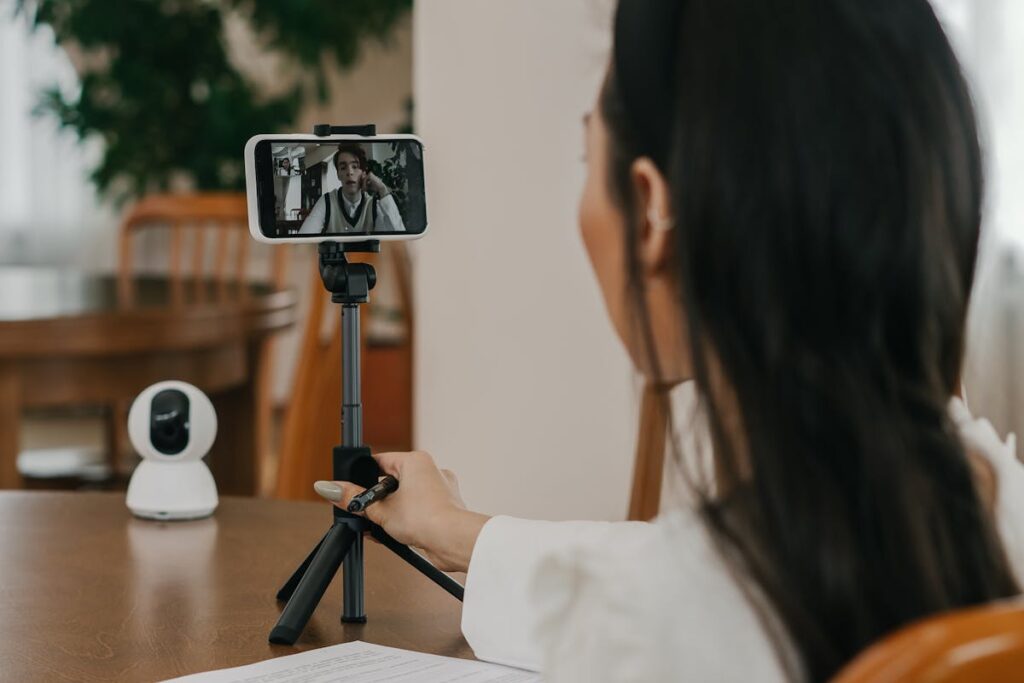
On video, looking at the face on your screen creates the impression, on the other side, of a candidate who is looking down or to the side. Looking at the camera lens creates the impression of direct eye contact — of a candidate who is engaged, present, and confident.
The practical solution: move the video window showing the interviewer’s face as close to the camera lens as possible. On most platforms, you can resize and reposition the video window. Move it to the top of your screen, as close to the camera as possible. This reduces the distance your gaze has to travel between the face you are looking at and the lens, making the adjustment easier to maintain.
You do not need to maintain lens-eye-contact continuously this would feel unnatural and look intense. Look into the lens when you are making a point, when you are beginning an answer, and when you want to signal engagement. Look at the face when you are listening, when you are thinking, when you are taking a breath. The combination creates the impression of natural, confident eye contact rather than a performance.
Pacing and the absence of social feedback
The degraded social feedback loop of video calls means that the natural regulation of conversational pace the subtle cues that tell you when to slow down, when you have overrun, when the other person wants to respond, is less available than in person.
The adjustments that compensate:
Build in pauses deliberately. In person, pauses feel natural because both people are in the same space. On video, pauses feel more awkward and are more likely to be pre-empted by the other person speaking. Resist the temptation to fill every pause immediately. A two-second pause after an answer signals that you have finished and are comfortable with silence a confidence marker that rapid, gap-filling speech does not.
End answers with a signal. Because you cannot rely on visual cues to tell you when the interviewer is ready to respond, ending answers with a verbal signal a concluding sentence that is audibly a conclusion, or occasionally an explicit “I’m happy to go into more detail on that” gives the interviewer a clear handoff point. This prevents the awkward simultaneous talking that happens when neither party is sure whether the other has finished.
Watch for the one-second delay. Video calls introduce latency typically one to two seconds between when you finish speaking and when the other person hears it. Interrupting into what sounds like a pause is actually interrupting mid-sentence. Leave a half-beat more space than feels natural before responding to avoid talking over the interviewer.
Presence and energy on camera
Camera compression reduces the apparent energy and expressiveness of most people. The enthusiasm that reads as engaged in person reads as neutral on camera; the neutrality that reads as calm in person reads as flat or disengaged on camera. This means that performing naturally for a video interview requires a slight calibration upward more deliberate expressiveness, more visible nods, more conscious facial engagement than you would deploy in a face-to-face room.
This does not mean performing it means translating. The energy you bring to a conversation you care about, expressed fully, produces approximately the right impression on camera. The energy you modulate for professionalism in person, compressed further by the medium, produces the impression of someone who is present but not enthusiastic.
Sit up. Not rigidly naturally upright, which positions your face in the frame correctly and signals physical engagement. Movement is fine and is in fact positive the candidate who is entirely still reads as tense on camera. Gestures that land within the frame are visible and natural; gestures that go outside the frame disappear. Calibrate the size of your gestures to the frame you are working within.
Managing notes without becoming dependent on them
One genuine advantage of video interviews is that notes are possible in a way they are not in person. Used correctly, notes can provide a scaffold for structured answers to common questions, a reminder of the specific examples you intend to use, and key facts about the organisation that you want to demonstrate knowledge of.
Used incorrectly, notes become a crutch that produces a candidate who is visibly reading answers rather than giving them breaking eye contact frequently, losing conversational rhythm, and projecting the impression of a performance rather than a presence.
The principle: notes should contain prompts, not answers. A bullet point that says “Project X outcome what I learned” is a scaffold you can glance at in half a second and then return to the camera. Three paragraphs of carefully written answer are something you have to read, and reading produces the impression of a candidate who did not trust themselves to speak naturally.
Prepare and practise your answers before the interview. Use notes to catch yourself if you lose your thread, not to deliver an answer you have not internalised.
Also read: What Romania’s Pay Data Reveals About Engineering and HR Salaries in 2026
The Asynchronous Interview: When There Is No Interviewer in the Room
A growing share of first-stage screening now uses asynchronous video platforms such as HireVue, Spark Hire, and Vidyard, where candidates record answers without a live interviewer.
This format is harder for many candidates because it removes social cues. There is no interaction, no feedback, and no conversational flow. You are speaking to a camera, which many people find more uncomfortable than live conversation.
Key adjustments improve performance.
Read each question fully before recording. Use the preparation time to understand what is being asked and plan your structure. Starting too quickly often leads to disorganised answers.
Treat the camera as an interviewer. Look into the lens, maintain steady pacing, and speak slightly slower than in conversation. Without live feedback, fast speech is harder to follow.
Use retakes carefully. Do not retake due to discomfort alone. Retake only if your answer breaks down, starts incorrectly, or has technical issues.
The first sentence matters most. Reviewers form early impressions that influence how they watch the rest. A clear, confident opening that directly answers the question sets a strong tone. A hesitant or generic opening weakens it.
Before the Interview: The Preparation Sequence That Removes Variables
The margin between a good video interview and an excellent one is often determined in the thirty minutes before the call begins, not during it. A preparation sequence that removes variables technical, environmental, and psychological creates the conditions in which your real capability can show up without competition from avoidable problems.
The day before: Test your full setup lighting, camera height, background, audio using a recording that you watch and listen to critically. Confirm that the interview platform works on your device and that you have the correct link. Charge all devices you will be using. Identify and solve any problems you find before the hour in which solving them creates stress.
Thirty minutes before: Close all unnecessary applications. Silence your phone and any notification systems. Inform anyone in your household that you are not to be interrupted. Position your notes where you can glance at them without moving the camera out of frame. Pour water and have it accessible without having to stand up.
Ten minutes before: Join the waiting room or test call. Do a final check of lighting, camera angle, and audio. Take three slow breaths — not for mystical reasons, but because controlled breathing reduces the physiological symptoms of interview anxiety (elevated heart rate, constricted vocal quality) in ways that are audible and visible on camera.
One minute before: Stop preparing. You have done the work. The preparation is complete. What is available to you now is your genuine capability, which is what the interviewer needs to see
The Impression That Remains
Every element covered in this guide has the same purpose: to ensure that the impression the hiring manager retains after your interview reflects your actual capability rather than the technical and performance friction that video adds between that capability and its perception.
The candidate who has prepared their environment, adjusted their eye contact, calibrated their energy for the camera, and managed their pacing is not performing a version of themselves. They are removing the interference between who they are and what the hiring manager can see.
In a world where 86% of first impressions are now formed through a camera, that removal is not a presentation skill. It is a professional competency one that is learnable, practicable, and consistently underinvested in by candidates who spend their preparation time only on what they will say.
The camera is the first impression. Make sure it is working for you.
Also read: Top 10 Compliance Hurdles for Remote IT Recruitment in 2026